Technology

  • Connecting the Dots: My Journey with AI Agents and the Reality of Compute

    Connecting the Dots: My Journey with AI Agents and the Reality of Compute

    The author explores the transition from using AI chat interfaces to employing agentic workflows for complex tasks. By treating AI as a collaborative staff member rather than a simple tool, the author achieves more in-depth analytical work despite challenges with platform-imposed resource limits and account access.

    Limitations in proprietary systems lead to an investigation of local, open-source models, which highlights the necessity of powerful hardware and GPU resources. These technical constraints suggest that successful investing in the AI sector requires a deep understanding of infrastructure and resource allocation beyond mere financial metrics.

    It is very rare to visualize the importance of a piece of concept if you don’t directly work in that field. Like really see it with your own eyes. For example, the importance of safety and security, in any industry, is most often felt and emphasized only after bad things happen.

    I had one of these moments when I connected many dots from investing in stocks to getting disabled by Anthropic out of my Pro account (a whole different story).

    My understanding of AI and the AI-related tech industry is close to 0.1. At its best I’m an AI enthusiast – I try different models and tools and read news and that’s that. Oh and I watch a lot of Youtube videos on this topic. 

    My tiny ah-ha really is really just about two and a half dots.

    The first dot: ai agents are real and they are the service industry as much as they are in the tech industry. 

    I have been using different models since GPT-4 on a regular basis and most of my use cases revolve around the chat experiences. I send over questions and documents, and ask LLMs to give me answers and solutions. It was not until the recent two weeks that I had to rely on Claude Cowork to rush out a in-depth analytical presentation for a high-stake meeting, that I realized the power of the agentic workflow and experience. 

    To be honest I hate this name – agentic – as it emphasizes more on its hype than its essence. To me, the difference (between working with something like Claude Cowork and working with the Chat) is this:

    You give a goal you want to achieve to the “agent” and it is the agent’s responsibility to figure out how to achieve it. 

    You cannot treat it like a tool to get answers from. It is much more than that.

    As a matter of fact, I feel I can do the same thing in Claude chat (the normal thing in your browser) and because the model is so smart that it can just break down the task to steps and then call the necessary tools. The only difference is that it doesn’t create the documents directly on your computer and you have to upload and download them manually. 

    So the biggest difference maker is still me: I stopped assuming that Claude needed lots of handholding and started asking difficult questions. I raised the bar – like I started to talk to it (like literally talk into the chat box via voice-to-text) like a staff member. What works. What doesn’t work. I show emotions by praising the work when the work is well done, and giving harsh feedback when the same mistake appears.

    The result was good, but not in ways that I had assumed. It didn’t really save too much time – as work expands to whatever time is available to finish the work. However, I’d say for the same time period, the work is definitely at least 50% more in-depth with much more data analyzed. I didn’t have to rely on my own to swim in the spreadsheet to discover insights. I just asked Claude to do that for me, and I just “guided” it to the conclusion I needed.

    If you are interested in this whole process you can read it here.

    The second dot: models are powerful but their ability to serve me (and you) is bound by availability of resources aka. tokens, and the mercy of model companies 

    I subscribed to Pro level and gained access to Cowork. Cowork, as powerful as it is, consumes tokens MUCH faster than normal chats. If you have multiple documents such as word docs or excel spreadsheets, these will all be read and counted as inputs.

    But it is necessary. Cowork’s power to work on the project level inside a folder with multiple documents is just another level. Once I tried that I just cannot go back to chatting. 

    Then I found myself checking the Usage page (Setting->Usage) on how much tokens are left and when the next session begins much more often. There is a name for this – anxiety. Claude once consumed 60% of the session tokens in just one attempt, and it was its fault because it forgot my way of working. 

    The result of my work is really at the mercy of Claude. Like how much tokens it gives directly influences how much work can be done in an afternoon. 

    And Claude doesn’t tell me how much token I have access to. At least I don’t know. And it could potentially decide one day that I’m not a worthy customer with my $20/month and all the compute and tokens will be distributed to the more generous enterprise customers. Or I could just be disabled (which I was).

    I feel like the same thing has happened to OpenAI too. I remember back in the day, ChatGPT would give really good answers although I was just a free user. Now that they start to emphasize making a profit, all the answers I get are bullet points. Like that is just humiliating. This just doesn’t make any sense; obviously the models are NOT becoming less powerful; even if OpenAI stopped further researching on more powerful models after GPT-4 the experience should at least remain the same, not worse. It is apparently a matter of resource allocation – or re-allocation – where precious resources go from serving people generating zero revenue (like me) to serving people paying.

    But what are tokens, really? And why am I (or anybody else) bound by its availability and why do I have to pay for them? All I can see is just a bar showing how much is left. What are the model companies such as OpenAi or Anthropic paying for that I only read about from the news – e.g. OpenAI wants to invest 100 Billion dollars building these data centers with the most advanced Nvidia GPUs?

    The third dot: these big model companies cannot be trusted but open source models are not free either. 

    Even before I was locked out of my Claude account, I had this hunch that open source models should somehow at least be part of my workflow, to lower the costs. As I was going through a Claude Code tutorial (an official one) I wanted to be a smart ass and instead of using an official Claude API key, I asked Claude Code (with my official account info signed in) to rewrite the essential codes so that I could hook up an OpenRouter API and use whatever model I wanted. I wasn’t sure if this was the real reason I got banned (and not one does), but on the same day I did it, I was locked out. 

    I got set back one generation away from my effective workflow and I desperately wanted to at least restore my ability to work on a project level. I am determined to make it happen whatever it takes. I still haven’t managed to accomplish this, but I have faith.

    With some research and Youtube video watching, it dawns on me that I can download open source models on my computer and just use it locally – without any API key, not even with the Internet! That is just mind blowing for me as for me, I never really experienced anything good that is free. And this is just next level. 

    Well, not so much. As it turns out, my M1/16GB-memory MacBook Air can only work with the most basic models. I downloaded Ollama and then Qwen3 with the 8B parameters and started chatting with the model in my terminal. It was so clunky and I felt like talking to ChatGPT 3. It is not smart at all. 

    Why is that though? Why I cannot use some of the more powerful models? I know Anthropic and OpenAi models are pripeirtary, but why open models with more parameters are also out of my reach at least according to the Youtube video tutorials?

    The answer comes to hardware. My computer aka. the hardware is not powerful enough to support the larger and more powerful local models. So in this sense, the model doesn’t care who it is – you, me, Anthropic, or OpenAI – if a more powerful model is needed, a more powerful hardware is required. 
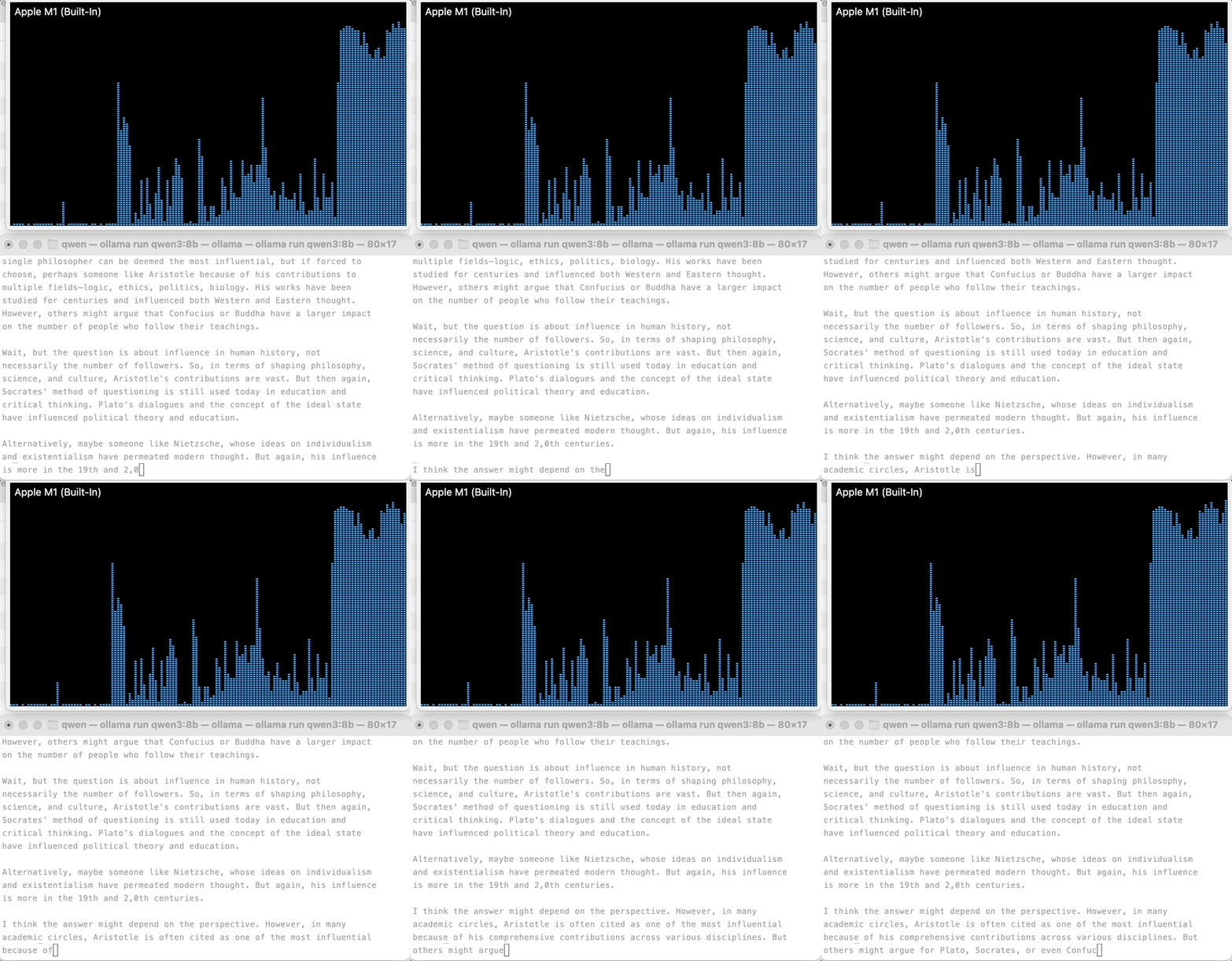
    The two windows above are 1. GPU history on the above and 2. a local model (Qwen3:8B) running locally in my terminal. The huge spike started when a question is asked and Qwen started to think about how to answer (the question was who was the most influential philosopher in human history?). 

    Now things start to make sense. A bigger model requires more powerful and ideally dedicated GPU with bigger RAM, both of which are expensive to individual consumers and companies the same. So even though theoretically I can use some powerful 1T parameter open source models like Kimi, I can never afford doing so, without Moonshot’s GPU clusters and teams of engineers. 

    The fourth dot: successful investing requires deep understanding of technology more so than ability to crunch numbers because the former provides a foundation for conviction.

    Being a professional manager in my day job, I’ve already believed the ability to understand how an organization – including its people and capital – works is the most important thing. However, this view is challenged more and more these days as I tinker with the models. The value of professional managers is deteriorating; we are essentially number crunchers without the domain knowledge of the main business (whatever that is). For example, a professional manager will unlikely be a great hospital administrator; such roles are almost always assumed by doctors because their knowledge of medicine and patient treatment is the foundation of administrative judgment. 

    On the other hand, I have come to terms with myself on the fact that whenever I get to hear on a rising stock, it is near the top. For example, with the current craze of AI and semiconductor stocks, I should not try to pick individual winners because whatever companies I know of, their growth has been achieved months ago. My chances of catching whatever growth that’s left should be with some targeted ETFs in the field, and ideally still a small portion of my portfolio should be allocated into it. 

  • How My Small Personal Blog Hit 100K Impressions—And the Strange Posts That Made It Happen

    How My Small Personal Blog Hit 100K Impressions—And the Strange Posts That Made It Happen

    Got another year working and learning on the side while keeping my day job. I will write an annual recap later but for now, I want to go back to the first project that I created, michaelshoe.com/.

    I started this personal site aka blog in January 2025 (or maybe Feb. 2025, can’t be sure) as a learning project. Since then, I’ve written over 100 articles (107 at this point) in nearly 2 years. This project has two folds of meanings:

    1. I was going through transitions in life and I wanted to use writing to clear my head
    2. I wanted to get better at using tech

    TL; DR

    Learnings summary:

    1. The biggest lesson: 10% of the product drives 90% of the results. 
    2. An even bigger lesson: you don’t know where results will come from beforehand; often they show up in the most surprising and unexpected place. For example, the biggest contributor to my site’s traffic is a series of solutions to Code in Place problems which I didn’t really expect too much from. 
    3. Search engine favors SOLUTION. If you want to leverage search as a discovery mechanism, create SOLUTIONS to peoples problems. This can mean in the most literal sense – like solutions to test problems!
    4. Other than SOLUTIONS, people also want RESOURCES – like transcripts of stories. For example, if you have a voice transcribe AI company you might create thousands of transcripts to different types of stories to drive traffic.
    5. A field such as finance is searched a lot and Google will try to serve as many relevant pages to a keyword as possible. However, this field is so competitive that your chance to rank high is very low.
    6. Search engine is an intent-solution matching entity in nature. Looking from a different perspective, the relationship between the site showing up on a SERP and the user clicking it is very transactional. After solving the problem, the user will quickly forget who you are and may never come back. This is where other types of platforms/ channels such as social media come in if you want to cultivate a parasocial relationship.

    Intro

    Before I started the blog, things just appeared so difficult in my head, and I just couldn’t push myself to even thinking about creating a site of my own. After I started, things were definitely unfamiliar to me, but I managed to navigate the unknowns by Googling and watching a lot of Youtube tutorials. 

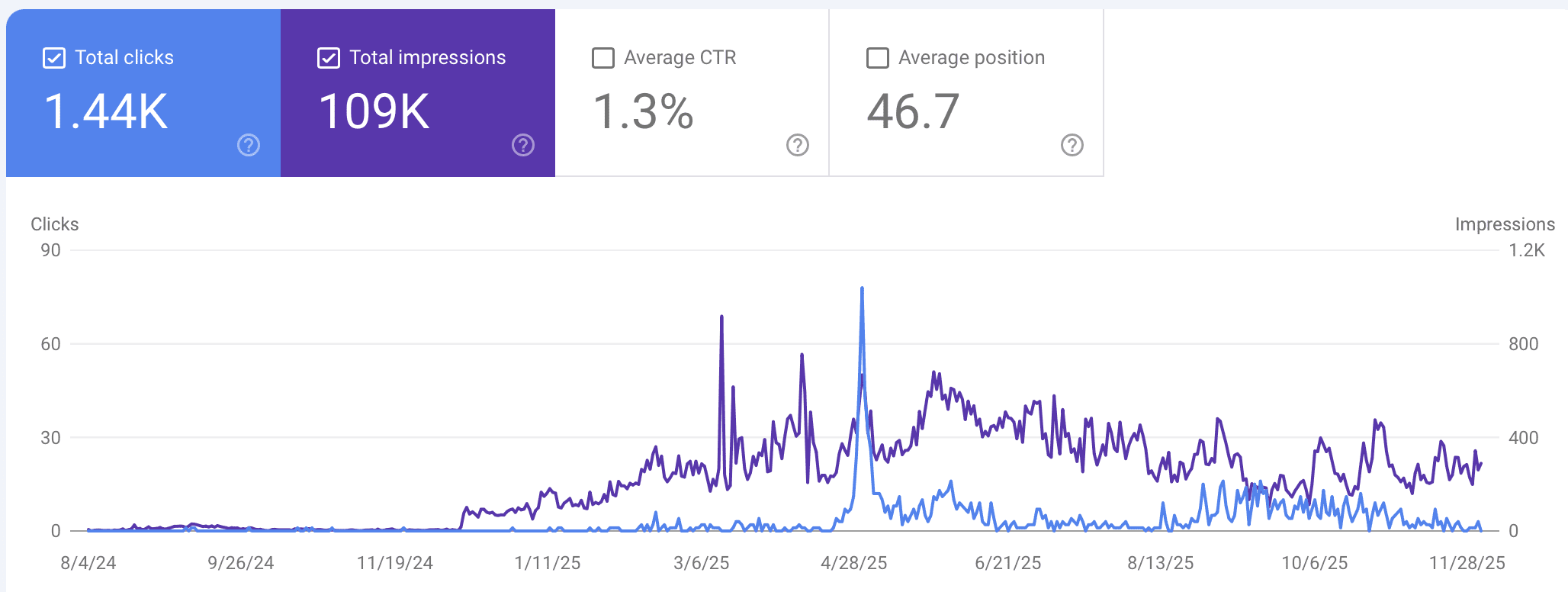
    Until now (Dec. 2025), michaelshoe.com/ has generated close to 109K impressions from Google Search and over 1400 clicks. 

    Aside from all the small learnings here and there, the biggest lesson from this project really comes down to this:

    10% of the product drives 90% of the results.

    The imbalance between my input and output is beyond me. And this is what I mean: a handful of articles drive the bulk of clicks to my blog. It’s not like anything I’ve done before where things are just – “linear” in nature. 

    84 of the 124 posts have 0 clicks.

    In other words, 68% of my writing has never been read by anybody other than me. Well, even I don’t read them after the writing. Only 40 posts have generated traffic and most are extremely low (think low single digitals).

    1 post is responsible for almost half of the site’s traffic.

    48% to be exact. Just from this one post: https://www.michaelshoe.com/checkerboard-karel-solution/

    The post (as well as five other posts) were solutions to coding problems from Code in Place – a free online coding course provided by Stanford University. I participated in Code in Place in 2024, and published these solutions on my personal blog.

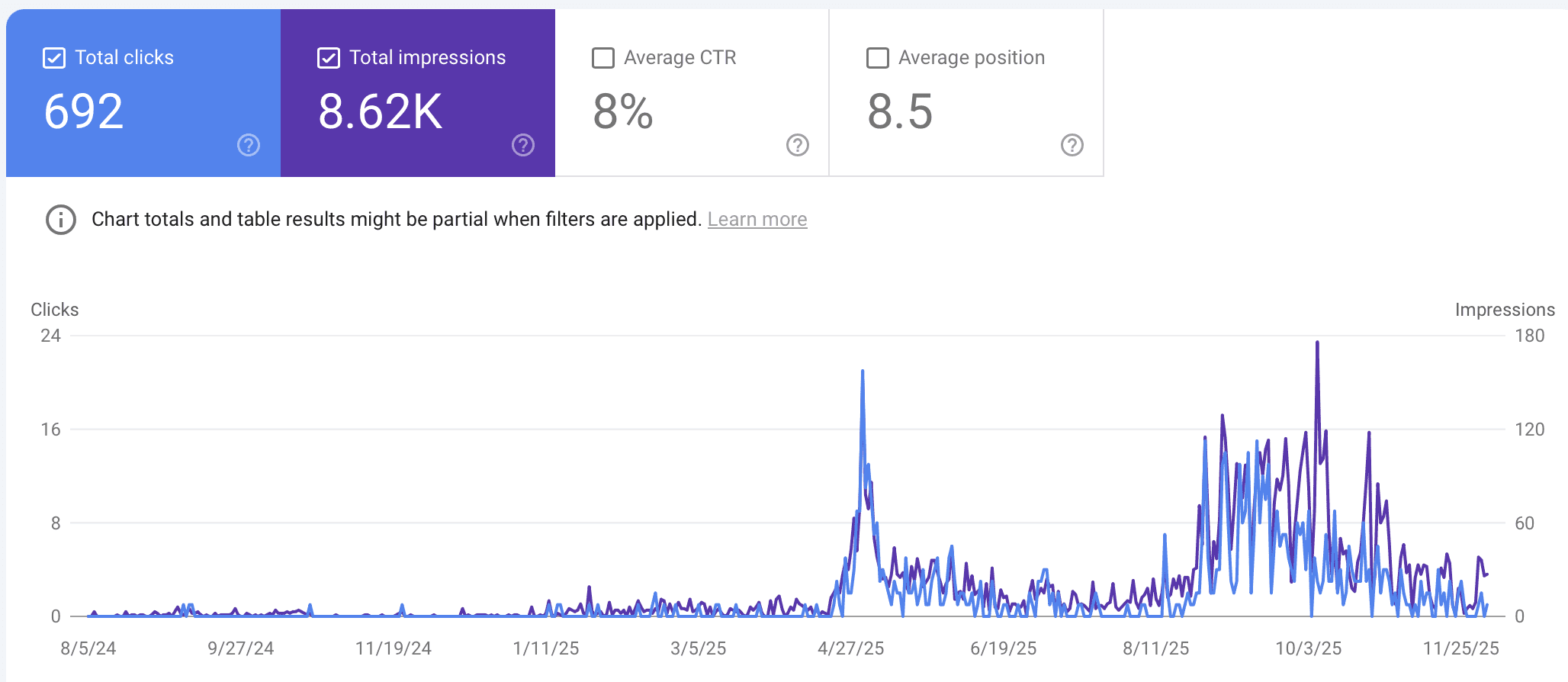
    This checkerboard karel solution gets a total of 8620 impressions from Google Search Result Pages, and around 8% of those impressions results into actual clicks to the post, or a total of 692 clicks.

    In addition, it takes time for Google to trust you.

    I wrote the Checkerboard Karel Solution (and other solutions) around May 2024 but it took a year until Code in Place 2025 for the posts to get traffic. This was when Code in Place was held again and probably many learners started to Google the solutions.

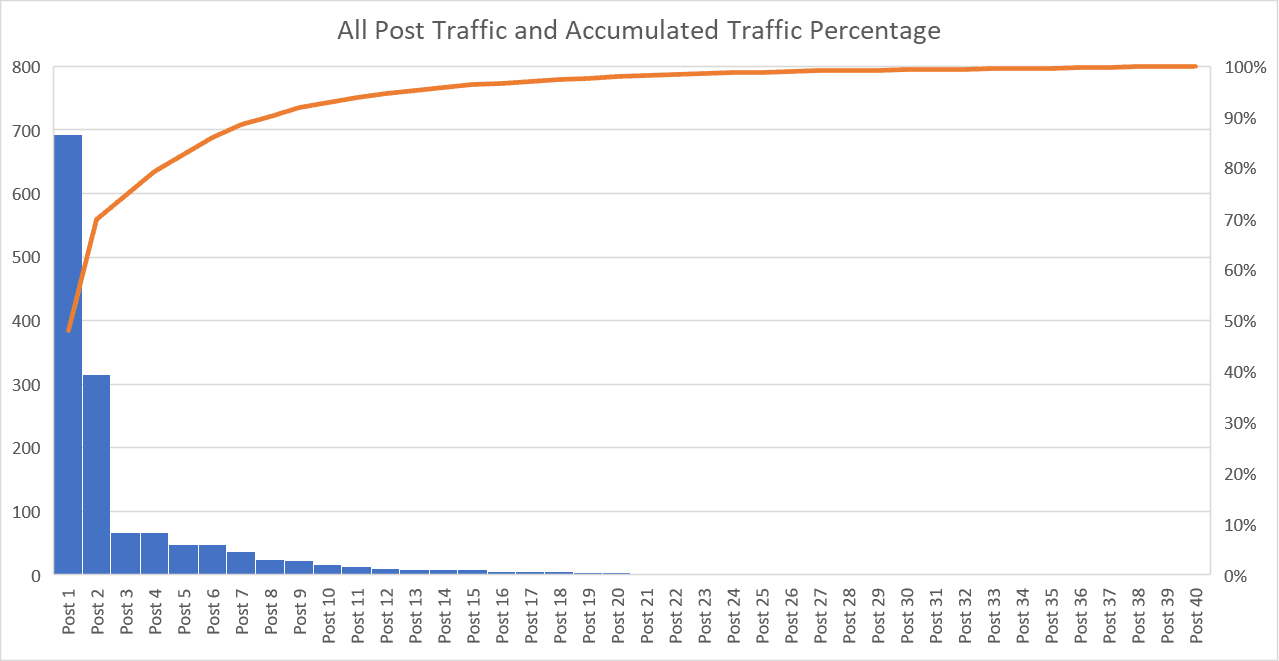
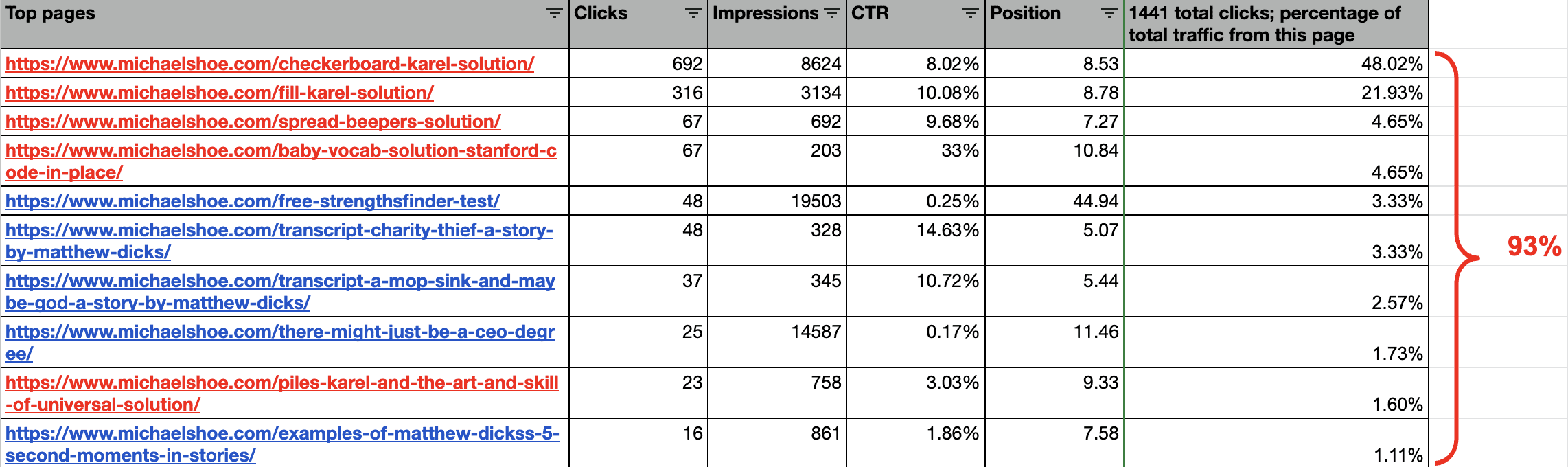
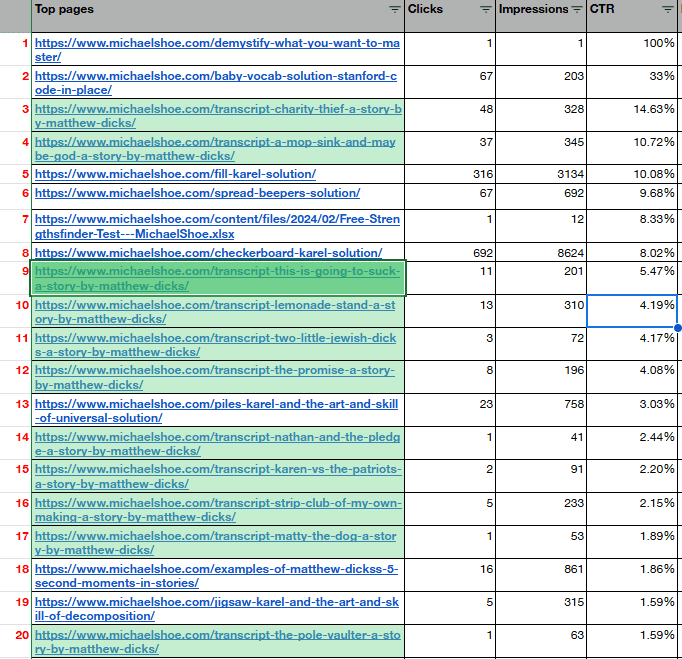
    The top 2 posts is responsible for 70% of traffic, and the top 10 posts for 93%.

    Outside of the top 10 posts, page traffic soon gets down to below 10. Posts 28 and beyond all have exactly ONE page visit each. 

    There are not only 1, but 5 ‘Code in Place’ solutions in the top 10 posts.

    I have marked all Code in Place solutions in red and as you can see, 5 of the top 10 posts belong to this category and all top 4 are occupied by it. 

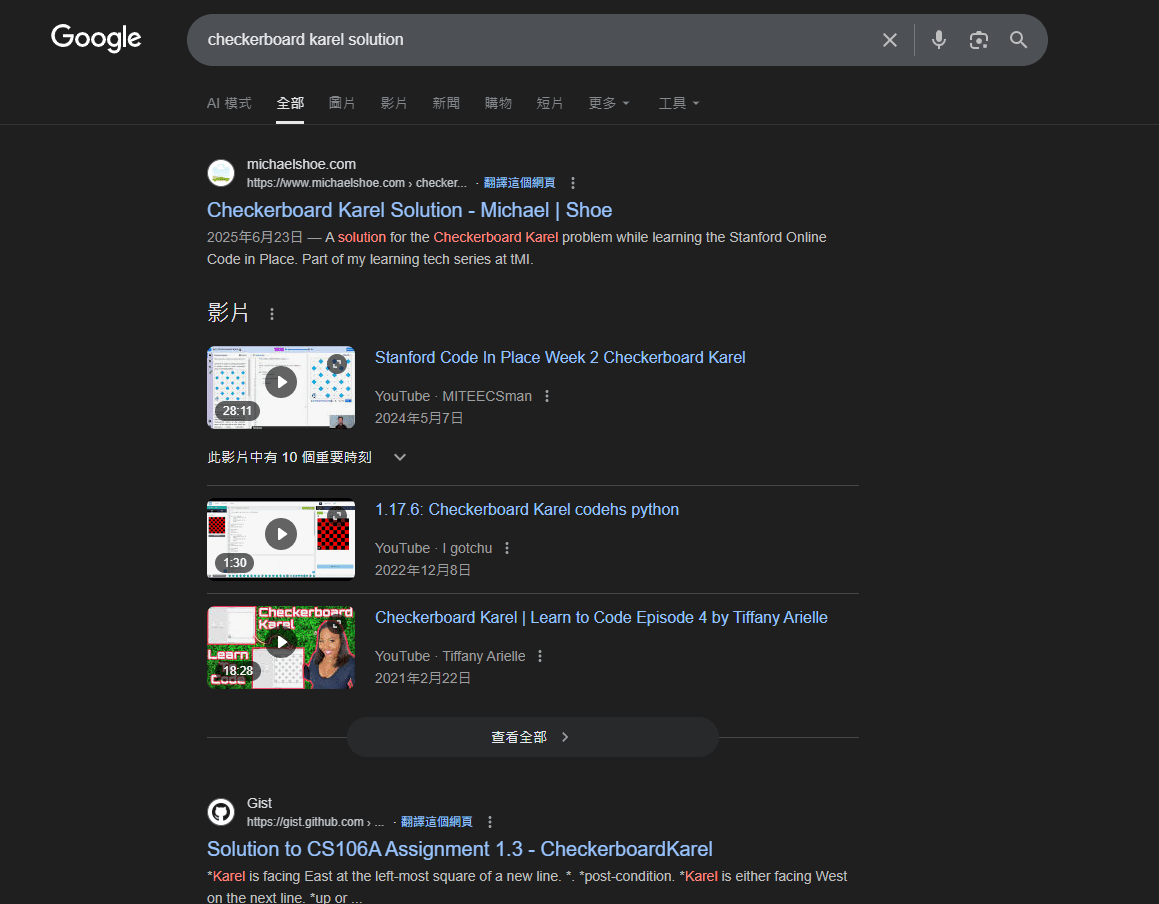
    Each of the top 4 posts ranks as the first for its main keyword. For example, my checkerboard karel solution post is currently ranking just below the Google search bar, and before the Youtube results. Here is its SERP in incognito mode:

    My other series – the Financial Analysis – have huge impressions with close-to-nothing traffic

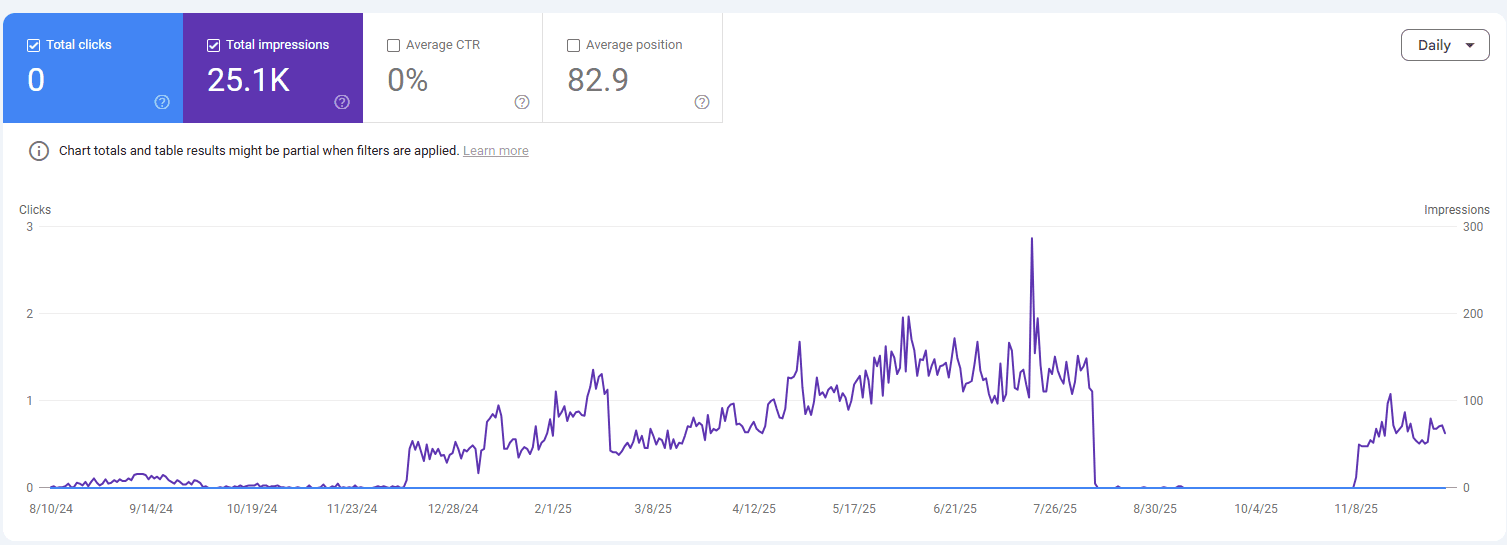
    The post that generates the most impressions among all is this: https://www.michaelshoe.com/how-to-understand-cash-inflow-and-outflow/

    Which has over 25,000 impressions but because its average position is so far below, it never gets clicked, generating a grand total of 0 traffic.

    I have written many posts in this series and seeing that none got read definitely doesn’t excite me. However it doesn’t really surprise me that much. 

    An unexpected surprise – my Matthew Dicks transcript series have some of the highest click through rate

    I learned storytelling by reading Matthew Dicks’ book “Storyworthy” and got really fascinated by the subject. I went on to watch some of Matthew telling the stories on Youtube and then created transcripts of the stories for further studying. 

    Even though this series of posts don’t have lots of impressions – like the one post with the most impressions only has 345 ranking at 31st – the CTRs are all surprisingly high. 11 of the 20 highest CTR posts are from this storytelling series.

    What to do with all the analysis

    Moving forward, I think it is important to understand all the learnings but I shouldn’t revolve all my writing around it. Like only write about solutions or create resources for people to find. We humans do have the drive to create things and writing can be just purely therapeutic. 

    However, I also have sites that I want to promote via writing, and these learnings can be very useful. This way I won’t waste time writing things with low traffic potential.

  • Should You Noindex Archive Pages in GeoDirectory? (Thin Content & SEO Tips)

    Should You Noindex Archive Pages in GeoDirectory? (Thin Content & SEO Tips)

    Intro

    While working on my TutorLounge project, I started worrying about archive pages with thin content in GeoDirectory.

    For example:

    • Category archives like /student-levels/early-childhood/
    • City archives like /new-york/white-plains/

    Some of these pages had very little content, and I wasn’t sure if they might hurt my SEO.

    So I asked GeoDirectory support: “Should I set certain archive pages as noindex, or just leave them?”

    Here’s what I learned.


    Problem

    GeoDirectory generates a lot of location and category archive pages. But not every city or category has enough listings to justify its own page.

    Result: you end up with thin pages (basically empty archives). The big question:

    • Do thin pages hurt SEO?
    • Should I noindex them?

    Solution

    The answer depends on your setup.

    1. Use an SEO Plugin (Yoast or Rank Math)

    Both Yoast and Rank Math let you easily control indexing:

    • You can noindex specific categories, tags, or CPT archives.
    • Or you can go page by page and mark thin archives as noindex.

    2. How Google Sees Thin Pages

    According to GeoDirectory support:

    • A few thin pages among strong ones are usually ignored by Google.
    • Having too many thin pages may hurt overall site quality.
    • If you’re unsure, it’s safer to noindex thin or low-value pages.

    3. Decide What to Keep Indexed

    • Keep indexed: important cities, strong categories with good listings.
    • Set noindex: small cities or categories with little/no content.

    Extra Notes

    • Sometimes Google automatically doesn’t rank thin pages — so you don’t always need to panic.
    • But manually setting noindex gives you more control and keeps your sitemap cleaner.
    • If you later add more listings to those thin pages, you can always remove the noindex tag.

    Conclusion

    Thin archive pages are common in GeoDirectory sites, but they don’t have to ruin your SEO.

    👉 Rule of thumb:

    • Keep high-value archives indexed.
    • Noindex thin/empty ones using Yoast or Rank Math.

    This way, you keep Google focused on your best content while still building out your site’s structure.

  • Fixing Sticky Columns on Mobile in GeoDirectory (Blockstrap)

    Fixing Sticky Columns on Mobile in GeoDirectory (Blockstrap)

    Intro

    After setting up my sticky sidebar column in GeoDirectory, it looked great on desktop.

    But when I checked on mobile, things broke — instead of stacking nicely under the main content, the sidebar turned into a slim, squished column.

    Here’s how I fixed it.


    Problem

    On desktop: sidebar = 25% width, content = 75%.
    On mobile: sidebar stayed at 25%, instead of expanding to 100%. This caused an ugly layout.


    Solution

    The trick is to use Blockstrap’s responsive column widths.

    1. Select the parent columns in Blockstrap editor.
    2. In Column Width settings:
      1. On Desktop:
        1. Left content column = 3/12 (25%).
        2. Right sidebar column = 9/12 (75%).
      2. On Mobile:
      3. Both columns = 12/12 (full width).
    3. For the child sticky column inside, always keep it at 12/12 (100% of parent).

    Use the device selector in the column width settings to apply different widths per device.


    Extra Notes

    • This is one of those small Blockstrap features I didn’t realize existed — you can toggle between desktop, tablet, and mobile column widths right in the editor.
    • Once I set them, the sticky sidebar stacked perfectly under the content on mobile.

    Conclusion

    Sticky sidebars don’t have to break your responsive layout. Just set column widths per device (desktop vs. mobile) in Blockstrap, and your design will look great everywhere.

  • How to Make a Sticky Sidebar Column in GeoDirectory (Blockstrap)

    How to Make a Sticky Sidebar Column in GeoDirectory (Blockstrap)

    Intro

    When I was customizing my GeoDirectory search results page, I wanted the right-hand sidebar (with filters) to stay fixed while scrolling — basically a sticky column.

    It’s not obvious how to do this in the Blockstrap editor, but GeoDirectory support showed me the trick.


    Problem

    By default, columns just scroll away with the page. I needed the search filters column to remain visible while the listing results scrolled.


    Solution

    Here’s the simple way to make a column sticky:

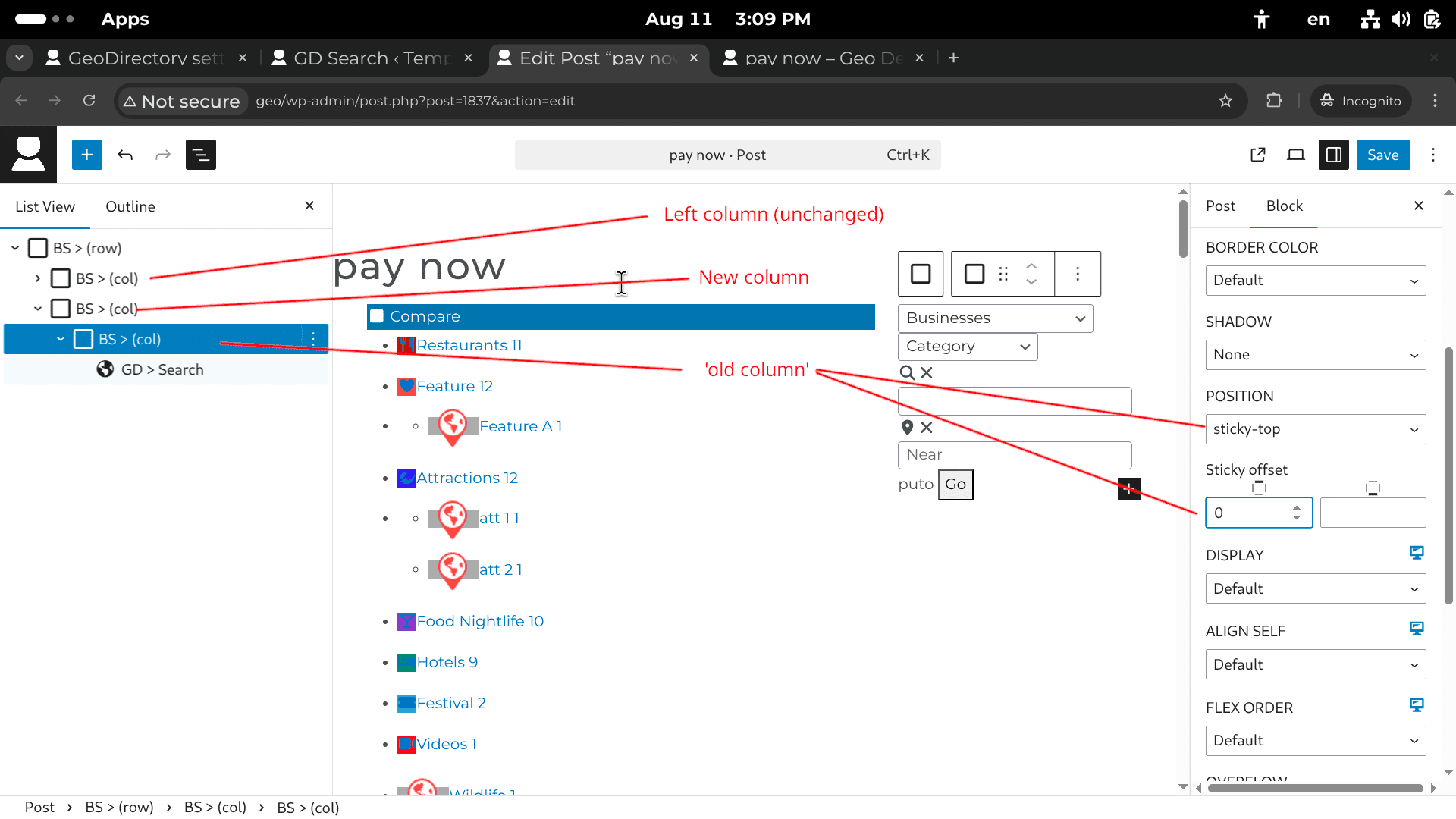
    1. In the Blockstrap editor, wrap the sidebar column inside a new BS > Container (col).
      1. Example: Right column → wrap it in its own parent container.
    2. Select that new parent container.
    3. In the Block settings (right panel):
      1. Set Position → sticky-top.
      2. Adjust Sticky offset (in pixels) to control how far from the top it “sticks” when scrolling.

    This keeps the sidebar fixed in place while the main content scrolls.


    Extra Notes

    • In my case, the “old column” was the one containing the GD > Search template part and the GD > Locations widget.
    • The offset is useful if you have a fixed header (so the sticky column doesn’t overlap it).

    Conclusion

    That’s it! Just wrap your sidebar column, set it to sticky-top, and you’ve got yourself a sticky filter column in GeoDirectory.