This message is very strong. I want to follow it for the second half of 2026 as much as possible.
As a habitual overthinker I really need it. I’m living in my illusion and I know it. I just didn’t know how to break out.
I’m going to just do – and the doing is writing and publishing about my use of Hermes Agent for creating and analyzing stuff. That’s it.
I’m not going to analyzing further. I’m not going to put any more or less meaning to it. There is no meaning – and this doesn’t diminish the importance of this project – it just means it is.
The reason I’m putting it this way is that I once spent multiple weeks debating with myself and Claude on the title of the thing, before I eventually did absolutely nothing. All those thinking – well I still don’t think are wasted – definitely didn’t yield to any tangible result.
So that’s it – shooting videos and publishing them on Youtube on what I do, what I learn, what problems I solve with Hermes, while asking people to sign up to a newsletter. Period.
Also something I heard that’s related
There are three layers of “understanding” in any area of knowledge work.
The first is pure knowledge such as information and concepts. This is you knowing something versus not knowing something. in the age of AI, no human beings can out knowledge the width of the machine. In other words, the value of knowing something is quickly diminishing to zero.
The second layer is skill such as application and practice. As time goes by AI will become more and more powerful and are already catching up to human’s ability in certain areas.
The third layer is wisdom. It is all the little things that can only be known with doing. This is where humans are irreplaceable. Although AI have gained all the knowledge from all the written words in the world, it hasn’t actually done a lot of the jobs. It hasn’t felt the pain of losing all the money in the financial market, or the ecstasy when the stocks skyrocket. Those feelings and scares you collect from actually doing the thing is the wisdom you bring to the table.
The reason I want to bring this up is that wisdom can only be obtained with taking actions aka doing. You cannot gain that just by watching Youtube videos or reading books, which has been what I did for a very long time. i often look back at my life in the past five years and think man how much I would have accomplished if I had just started doing the thing – just one thing. I was into productivity and got interested in productivity software; I didn’t get great at any and now I see people making money from selling Notion templates, i just cannot help but think what if. Five years have gone by and I feel like I’m still in the same spot.
The author explores the transition from using AI chat interfaces to employing agentic workflows for complex tasks. By treating AI as a collaborative staff member rather than a simple tool, the author achieves more in-depth analytical work despite challenges with platform-imposed resource limits and account access.
Limitations in proprietary systems lead to an investigation of local, open-source models, which highlights the necessity of powerful hardware and GPU resources. These technical constraints suggest that successful investing in the AI sector requires a deep understanding of infrastructure and resource allocation beyond mere financial metrics.
It is very rare to visualize the importance of a piece of concept if you don’t directly work in that field. Like really see it with your own eyes. For example, the importance of safety and security, in any industry, is most often felt and emphasized only after bad things happen.
I had one of these moments when I connected many dots from investing in stocks to getting disabled by Anthropic out of my Pro account (a whole different story).
My understanding of AI and the AI-related tech industry is close to 0.1. At its best I’m an AI enthusiast – I try different models and tools and read news and that’s that. Oh and I watch a lot of Youtube videos on this topic.
My tiny ah-ha really is really just about two and a half dots.
The first dot: ai agents are real and they are the service industry as much as they are in the tech industry.
I have been using different models since GPT-4 on a regular basis and most of my use cases revolve around the chat experiences. I send over questions and documents, and ask LLMs to give me answers and solutions. It was not until the recent two weeks that I had to rely on Claude Cowork to rush out a in-depth analytical presentation for a high-stake meeting, that I realized the power of the agentic workflow and experience.
To be honest I hate this name – agentic – as it emphasizes more on its hype than its essence. To me, the difference (between working with something like Claude Cowork and working with the Chat) is this:
You give a goal you want to achieve to the “agent” and it is the agent’s responsibility to figure out how to achieve it.
You cannot treat it like a tool to get answers from. It is much more than that.
As a matter of fact, I feel I can do the same thing in Claude chat (the normal thing in your browser) and because the model is so smart that it can just break down the task to steps and then call the necessary tools. The only difference is that it doesn’t create the documents directly on your computer and you have to upload and download them manually.
So the biggest difference maker is still me: I stopped assuming that Claude needed lots of handholding and started asking difficult questions. I raised the bar – like I started to talk to it (like literally talk into the chat box via voice-to-text) like a staff member. What works. What doesn’t work. I show emotions by praising the work when the work is well done, and giving harsh feedback when the same mistake appears.
The result was good, but not in ways that I had assumed. It didn’t really save too much time – as work expands to whatever time is available to finish the work. However, I’d say for the same time period, the work is definitely at least 50% more in-depth with much more data analyzed. I didn’t have to rely on my own to swim in the spreadsheet to discover insights. I just asked Claude to do that for me, and I just “guided” it to the conclusion I needed.
If you are interested in this whole process you can read it here.
The second dot: models are powerful but their ability to serve me (and you) is bound by availability of resources aka. tokens, and the mercy of model companies
I subscribed to Pro level and gained access to Cowork. Cowork, as powerful as it is, consumes tokens MUCH faster than normal chats. If you have multiple documents such as word docs or excel spreadsheets, these will all be read and counted as inputs.
But it is necessary. Cowork’s power to work on the project level inside a folder with multiple documents is just another level. Once I tried that I just cannot go back to chatting.
Then I found myself checking the Usage page (Setting->Usage) on how much tokens are left and when the next session begins much more often. There is a name for this – anxiety. Claude once consumed 60% of the session tokens in just one attempt, and it was its fault because it forgot my way of working.
The result of my work is really at the mercy of Claude. Like how much tokens it gives directly influences how much work can be done in an afternoon.
And Claude doesn’t tell me how much token I have access to. At least I don’t know. And it could potentially decide one day that I’m not a worthy customer with my $20/month and all the compute and tokens will be distributed to the more generous enterprise customers. Or I could just be disabled (which I was).
I feel like the same thing has happened to OpenAI too. I remember back in the day, ChatGPT would give really good answers although I was just a free user. Now that they start to emphasize making a profit, all the answers I get are bullet points. Like that is just humiliating. This just doesn’t make any sense; obviously the models are NOT becoming less powerful; even if OpenAI stopped further researching on more powerful models after GPT-4 the experience should at least remain the same, not worse. It is apparently a matter of resource allocation – or re-allocation – where precious resources go from serving people generating zero revenue (like me) to serving people paying.
But what are tokens, really? And why am I (or anybody else) bound by its availability and why do I have to pay for them? All I can see is just a bar showing how much is left. What are the model companies such as OpenAi or Anthropic paying for that I only read about from the news – e.g. OpenAI wants to invest 100 Billion dollars building these data centers with the most advanced Nvidia GPUs?
The third dot: these big model companies cannot be trusted but open source models are not free either.
Even before I was locked out of my Claude account, I had this hunch that open source models should somehow at least be part of my workflow, to lower the costs. As I was going through a Claude Code tutorial (an official one) I wanted to be a smart ass and instead of using an official Claude API key, I asked Claude Code (with my official account info signed in) to rewrite the essential codes so that I could hook up an OpenRouter API and use whatever model I wanted. I wasn’t sure if this was the real reason I got banned (and not one does), but on the same day I did it, I was locked out.
I got set back one generation away from my effective workflow and I desperately wanted to at least restore my ability to work on a project level. I am determined to make it happen whatever it takes. I still haven’t managed to accomplish this, but I have faith.
With some research and Youtube video watching, it dawns on me that I can download open source models on my computer and just use it locally – without any API key, not even with the Internet! That is just mind blowing for me as for me, I never really experienced anything good that is free. And this is just next level.
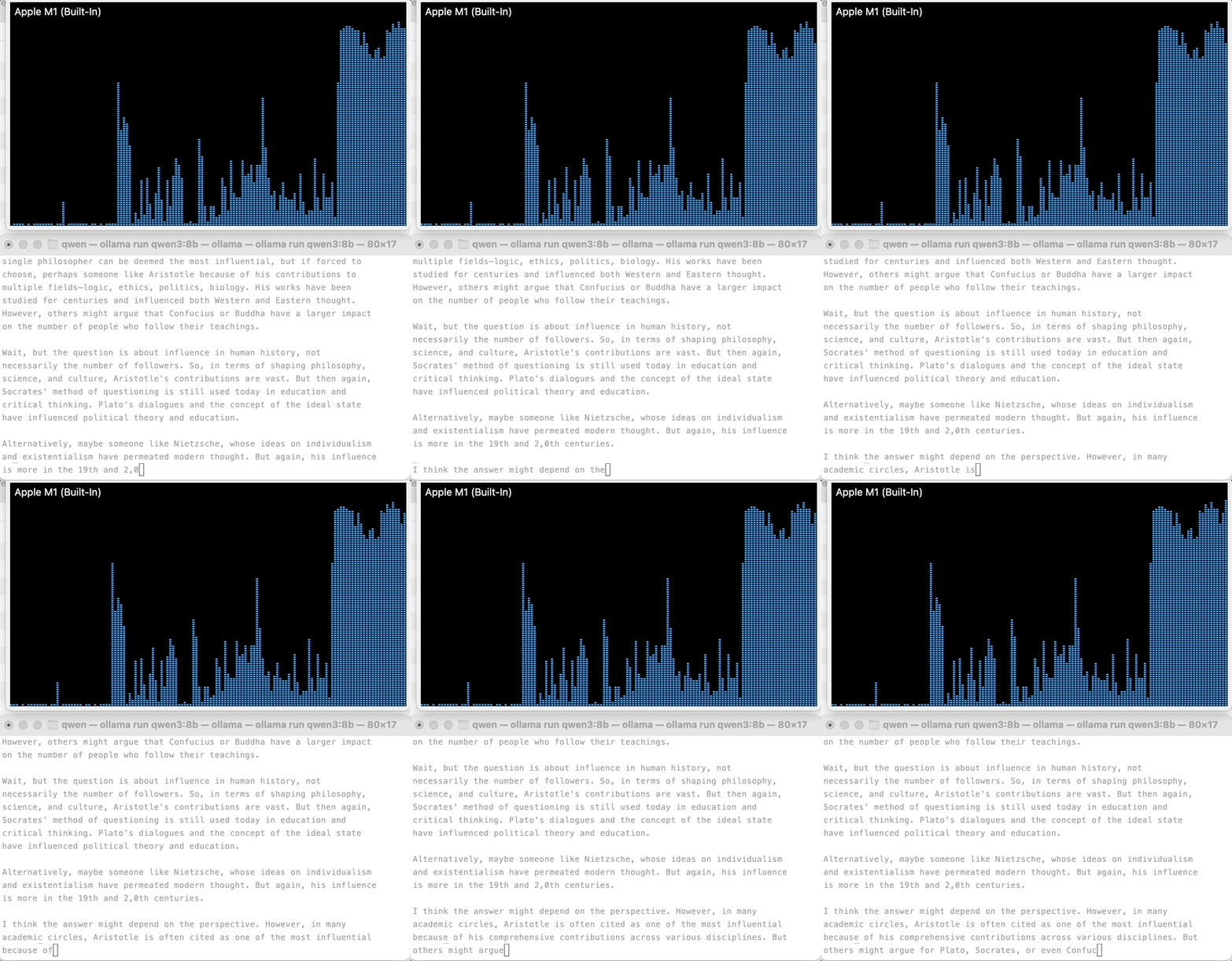
Well, not so much. As it turns out, my M1/16GB-memory MacBook Air can only work with the most basic models. I downloaded Ollama and then Qwen3 with the 8B parameters and started chatting with the model in my terminal. It was so clunky and I felt like talking to ChatGPT 3. It is not smart at all.
Why is that though? Why I cannot use some of the more powerful models? I know Anthropic and OpenAi models are pripeirtary, but why open models with more parameters are also out of my reach at least according to the Youtube video tutorials?
The answer comes to hardware. My computer aka. the hardware is not powerful enough to support the larger and more powerful local models. So in this sense, the model doesn’t care who it is – you, me, Anthropic, or OpenAI – if a more powerful model is needed, a more powerful hardware is required.
The two windows above are 1. GPU history on the above and 2. a local model (Qwen3:8B) running locally in my terminal. The huge spike started when a question is asked and Qwen started to think about how to answer (the question was who was the most influential philosopher in human history?).
Now things start to make sense. A bigger model requires more powerful and ideally dedicated GPU with bigger RAM, both of which are expensive to individual consumers and companies the same. So even though theoretically I can use some powerful 1T parameter open source models like Kimi, I can never afford doing so, without Moonshot’s GPU clusters and teams of engineers.
The fourth dot: successful investing requires deep understanding of technology more so than ability to crunch numbers because the former provides a foundation for conviction.
Being a professional manager in my day job, I’ve already believed the ability to understand how an organization – including its people and capital – works is the most important thing. However, this view is challenged more and more these days as I tinker with the models. The value of professional managers is deteriorating; we are essentially number crunchers without the domain knowledge of the main business (whatever that is). For example, a professional manager will unlikely be a great hospital administrator; such roles are almost always assumed by doctors because their knowledge of medicine and patient treatment is the foundation of administrative judgment.
On the other hand, I have come to terms with myself on the fact that whenever I get to hear on a rising stock, it is near the top. For example, with the current craze of AI and semiconductor stocks, I should not try to pick individual winners because whatever companies I know of, their growth has been achieved months ago. My chances of catching whatever growth that’s left should be with some targeted ETFs in the field, and ideally still a small portion of my portfolio should be allocated into it.
A brutally honest account of using AI to build a real corporate presentation — not a demo, not a toy project.
I just finished a week-long project building a half-year industry analysis presentation for a large company with six subsidiaries across multiple business verticals. Thirty-plus slides, six companies, three years of operational data to cross-reference, and a deadline that didn’t move.
I used Claude — specifically a combination of Claude’s chat interface, its desktop Cowork app, and its Office plugins for Word and Excel — as my primary co-worker throughout. Not as a toy. Not as a “let’s see what AI can do” experiment. As an actual production tool on a real deliverable.
Here’s what I learned. The honest version.
The Setup
The brief: a 2026 H1 analysis report for a large company with six subsidiary businesses across multiple verticals. Leadership wanted forward-looking projections where possible. The data lived across dozens of operational reports — Word documents, each one extremely long — plus spreadsheets. Six companies. Three reporting periods each. That’s 18+ documents just for the core data layer, before touching anything about structure or narrative.
I had no template. I had no clear starting point. I had a pile of source material and a deadline.
This is where AI actually earns its keep — or fails you.
What I Did Wrong First
Let me start with the mistakes, because they’ll save you more time than the wins will.
Mistake #1: I tried to build on top of an existing PPT file.
My first instinct was sensible: don’t start from zero, grab a previous version from a colleague and iterate from there. Hand it to Claude, ask it to update slide by slide.
This is a trap.
Every time Claude touches a task involving an existing PowerPoint file, it re-reads the entire thing from scratch. It tries to understand the whole structure, all the existing slides, the formatting logic — before doing anything you actually asked for. I watched one session burn through 60% of its context window just trying to insert a single new slide. The deck barely moved. My progress stalled completely.
The fix: stop trying to edit an existing file. Generate each slide as a standalone output and paste it in yourself. More on this below.
Mistake #2: I gave Claude too much context, thinking more was always better.
It isn’t. Dumping all 18 source documents into one session and asking Claude to “just figure it out” produces confused, generic output. The model gets pulled in too many directions. What I started calling “context contamination” is real — irrelevant material in the context window quietly degrades the quality of the output you actually wanted.
The fix: treat each slide as an isolated task. Only load the files relevant to that specific slide.
The Workflow That Actually Worked
After the wrong turns, I landed on a four-phase system.
Phase 1 — Plan in chat, not in Cowork.
Before touching the desktop app or generating a single slide, I spent time in a Claude chat Project just reading and thinking. I uploaded source documents, asked Claude to help me understand what data I actually had, and together we worked out a chapter structure and a rough outline of what each section needed to contain.
The critical thing here: you have to do this yourself. Claude can help you brainstorm, but you have to be the one who actually understands your material. If you can’t judge whether a proposed structure makes sense, you can’t course-correct when Claude gets it wrong — and it will get things wrong. Your judgment is not optional.
Phase 2 — Extract data using the Office plugins.
This was the biggest surprise of the project: Claude inside Word and Excel is genuinely powerful for data work, in a way that the standalone chat interface isn’t.
With Claude in Word, I opened three operational reports simultaneously and asked it to cross-reference them — pull the same hotel’s revenue figures across Q1 2025, H1 2025, and Q1 2026 in one pass. It did. That would have taken me an hour manually. It took maybe three minutes.
With Claude in Excel, I could ask open-ended analytical questions directly against the spreadsheet data. Not “apply this formula” — actual questions like “which segment showed the steepest decline in the back half of the year and what’s driving it?” Claude would locate the relevant data, analyze it, and discuss the findings with me interactively. This is not a smart autocomplete. It’s a different kind of tool.
Phase 3 — Build slides one at a time in Cowork, with strict isolation.
Here’s the discipline that made Cowork actually work: one slide (or one cluster of closely related slides) per conversation. One task. Clean context.
My process for each slide:
Copy the relevant source files into a fresh working folder
Open a new Cowork conversation
Tell Claude exactly which files to read and what I need
Ask for a written work plan and outline before any slide generation
Iterate on the content through conversation until it’s right
Only at the very end, ask for the actual PowerPoint output
That last point is important. Generating the PPT is the last small step, not the first. Most of the real work — the thinking, the structuring, the data decisions — happens in conversation. If you jump straight to “make me a slide,” you burn tokens on something you haven’t thought through yet, and the output reflects that.
Phase 4 — You manage the master file. Not Claude.
The master PowerPoint file lives in a completely separate folder that Cowork cannot see. Claude generates individual slides; I copy and paste them in manually.
This sounds tedious. It is slightly tedious. It is also the reason I never had to spend an afternoon rolling back a corrupted file. When Claude can’t see your master file, it can’t accidentally overwrite, reorder, or misinterpret it. The manual paste is cheap insurance.
The Tools, Mapped to Their Jobs
Tool
What it’s actually good for
Claude chat (Project)
Planning, brainstorming, making sense of source material
Claude in Word
Cross-referencing multiple documents you already have open
Claude in Excel
Open-ended analysis and Q&A against live spreadsheet data
Mostly skipped — Cowork handled this better in practice
The Honest Summary
AI didn’t make this presentation for me. It made it possible for me to make this presentation in a week instead of three.
The parts that still required me: understanding the source material, judging whether a structure was right, deciding what story the data was telling, and managing the final output. None of that got automated away. What got automated was the tedious cross-referencing, the reformatting, the “turn this table into a slide” mechanical work that used to eat hours.
The traps are real. Handing Claude a messy context and hoping for magic doesn’t work. Treating it like a simple command-line tool doesn’t work. What works is treating it like a smart but context-blind collaborator — one who needs clear instructions, bounded tasks, and a human in the loop who actually knows what good looks like.
If you’re building complex decks and you haven’t tried this yet, try it. Just start with the isolation discipline. One slide, one conversation. Don’t let it touch your master file. Do the planning in chat first.
It won’t feel like magic. It’ll feel like having a very fast, very capable assistant who needs good management. That’s exactly what it is.
If 2024 was about starting—buying the domains, signing up for the subscriptions, and figuring out what “building online” actually meant—2025 was about refining.
Last year, I cast a wide net. I paid for memberships I didn’t use and tools I didn’t need. This year, my goal was to run leaner and smarter. I wanted every dollar leaving my bank account to directly contribute to two things: infrastructure(keeping the lights on) or growth (getting eyes on the projects).
Here is exactly what I spent in 2025 to keep my portfolio of projects running, growing, and evolving.
The Bottom Line
Total 2025 Spend: $1,273.11
Compared to the scattershot approach of my first year, this number feels tighter. It’s focused. There is very little “fat” here—just the engines I need to keep moving forward.
Here is the breakdown of where that money went.
1. The Foundation: Infrastructure & Hosting ($484.94)
Before you can sell or grow, you need a place to live. My biggest shift this year was locking in long-term stability rather than paying monthly premiums.
Hosting: I committed to Hostinger with a 4-year plan ($129.17). It’s a larger upfront hit, but it secures my runway for the foreseeable future without monthly billing stress. I also kept Ghost.io ($108.00) for my primary publishing platform because the writing experience is unmatched.
Domains: I’m currently managing a portfolio of projects including chironearme.org, skateboardparknearme.com, tutorlounge.me, and https://www.google.com/search?q=findcoworkingspaces.com. Between renewals and new registrations on Porkbun, I spent roughly $71.02.
Directory Tech: I invested $171.75 in GeoDirectory. Since programmatic SEO and directories are a core part of my strategy, this was a necessary tool to manage location-based data effectively.
2. The Engine: AI & Automation ($203.39)
This category didn’t exist for me a few years ago. Now, it’s my second most critical expense. I am no longer just “writing” content; I am engineering it.
Perplexity API ($115.00): This has become my daily driver for research and answer synthesis. I topped up my credits 7 times throughout the year—it’s utility bill I’m happy to pay.
GPT for Sheets ($87.00): Connecting LLMs directly to my data spreadsheets allows me to clean data and generate content programmatically.
DeepSeek ($1.39): Testing the waters with other models to see where I can save costs without losing quality.
3. Growth: SEO & Marketing ($484.79)
If I build it, will they come? Only if I have the data to tell me what they are searching for. This year, I stopped guessing and started paying for data.
Ubersuggest ($290.00): My single biggest purchase of the year. I bought the lifetime deal to stop bleeding monthly subscription fees for keyword research.
Data Scraping: I spent $74.79 on Outscraper and $45.00 on Keywords Everywhere. These tools fueled my directory sites (Skateparks, Tutors, Coworking) with actual leads and real-world data points.
Content Operations: I paid $75.00 for Typefully to manage my social scheduling. It keeps my posting consistent without me having to be online 24/7.
What I Cut (The “Anti-Portfolio”)
Perhaps more important than what I bought is what I stopped buying.
In 2024, I paid for Twitter Premium, Medium memberships, and various “shiny object” tools like WP All Import(which I refunded). In 2025, I let those expire. I realized that paying for a checkmark or a paywalled reading platform wasn’t moving the needle for my business.
Looking Ahead
My burn rate is now just over $100/month, but that includes massive one-time investments like the 4-year hosting deal and the Ubersuggest lifetime account. My actual recurring costs are much lower.
For the next year, the goal remains the same: keep the infrastructure lean, pour resources into data and automation, and let the projects compound.
When I got accepted into business school for the 2024 intake, I faced a choice: pay a $5,000 deposit to secure my spot, or invest that money in learning on my own. I chose the latter. I gave myself permission to explore, experiment, and fail forward—building skills, not just credentials. Over the past year, I tried courses, tools, and platforms that promised to help me create content, understand marketing, learn tech, and grow online. Here’s a documentation of everything I paid for, why I got it, and how it helped me start building online.
Doing Content Right by Steph Smith
What it is: “Doing Content Right” is a beginner-friendly guide to digital content, marketing, and SEO. Created by Steph Smith, it walks you through building an audience, creating content that matters, and understanding the basics of SEO. It’s approachable for someone just starting out and full of practical advice.
Price: $150 (50% discount available if you read the intro—so $75!)
My thoughts & lessons learned:If you are completely new to the online building world, Steph did a great job explaining the different parts as well as the basic mindsets that can help you start strong. She has this rare ability of simplifying concepts, and you will feel less intimidated. The biggest takeaway I got from this book is to switch from an online consumer mindset to an online builder mindset.
Domain Purchase: michaelshoe.com/
What it is: Buying a domain is the first step to owning your online presence. I purchased my domain from Porkbun. For a non-tech person like me, this small step was a confidence booster—it forced me to get comfortable with the basics of online tools and experimenting with websites.
Price: $10.50/year
My thoughts & lessons learned: When I first landed on the porkbun site, things didn’t really make much sense – I didn’t know what I was doing but just sort of followed my intuition. Basically you are just buying a human-friendly name for your own site, which you can build content on afterwards. Don’t overthink this step, and don’t stress about making sense of it. Treat it like you are buying a piece of art at a reasonable price, a piece that you can later enhance further with your own strokes and touches. Porkbun’s support is great and responsive, so whenever you have questions, just shoot them an email.
Ghost Pro Plan (with Hosting)
What it is: Ghost.org is a content management system (CMS) focused on publishing. Hosting on platforms like Digital Ocean can be challenging, so I went with Ghost’s Pro plan. It’s beginner-friendly and comes with built-in hosting, SEO features, newsletters, and membership options—all in one package.
Price: $108/year
My thoughts & lessons learned:I followed Steph’s suggestions and built my site on Ghost. The UI is very intuitive and straightforward, which certainly helped for a non-techie like me. Ghost is also search engine friendly. However, I later learned how to build on WordPress and I’m contemplating transferring michaelshoe.com/ to WordPress to save some money.
SEO for Solopreneurs by Nat Eliason
What it is: This course teaches SEO strategies specifically for solo founders and small teams. You learn how to do keyword research, optimize content, and drive organic traffic. I followed it after Steph Smith highly recommended Nat Eliason’s approach, though I didn’t fully implement it, so my results were limited.
Price: $99
My thoughts & lessons learned:I probably could have learned everything for free on Youtube but the good thing with Nat’s course is that everything is structured. If you are new to the concept of SEO, it is still worth paying $99 for the course. However, Steph Smith’s book includes a full chapter of SEO so I’d say I might have double paid for the knowledge.
Keywords Everywhere – Silver Plan
What it is: Keywords Everywhere is an SEO research tool. It helps you check keyword competitiveness, search volume, and trends.
Price: $60/year
My thoughts & lessons learned: It’s great for planning content that people are actually searching for, but I admit I didn’t use it enough to get its full value.
Medium Membership
What it is: Medium is a platform where writers can publish articles and get paid through revenue sharing. It’s beginner-friendly for writers who want distribution without building a full website first. I started here but eventually stopped posting.
Price: $50/year
My thoughts & lessons learned:The goal of Medium is to use it as a discovery method for my blog posts. I know people are still reading on Medium, but it didn’t make sense to me after a while.
Mangool SEO Tool Membership
What it is: Mangools is a comprehensive SEO suite. It includes tools for keyword research, backlink analysis, and tracking your rankings. It’s more advanced than basic tools, which makes it useful for planning a content strategy, but I didn’t fully commit to using it.
Price: $358/year
My thoughts & lessons learned:I didn’t fully utilize all the functions in Mangool to be honest. Also I found myself doing more research than I should without committing to any actions. So I stopped using it.
SimpleScraper Membership
What it is: SimpleScraper is a web scraping tool that lets you extract structured data from websites. I initially bought it to research property prices, but it can also be used for competitive analysis, lead generation, or market research. A powerful tool for data-driven projects.
Price: $70/year
My thoughts & lessons learned:This is a great tool but there are also many other similar web scraping tools out there. You may try whichever one you like.
Porkbun Mail Hosting
What it is: This service allows you to send and receive emails from your domain (hi@michaelshoe.com). It gives a professional impression, but as a beginner, it wasn’t necessary—I could have used Gmail instead.
Price: $24/year
My thoughts & lessons learned:You don’t need to complicate it when just starting; and people won’t treat you differently because of it.
Ship30for30 Writing Course
What it is: Ship30for30 is a cohort-based course designed to help new writers start publishing daily content. It’s great for accountability and community support.
Price: $300
My thoughts & lessons learned: I ended up getting a refund because of the price and some repetition in content, but the structure is solid for beginners.
X Basic Membership
What it is: The basic X membership allows posting longer-form content on X (formerly Twitter), which is essential for growing an online presence as a solopreneur or writer.
Price: $32.25
My thoughts & lessons learned:To be honest, paying for a membership especially a basic one doesn’t make sense. You don’t get the blue checkmark anyway and there are no effects on your contents’ impressions. At the end of the day, it’s still about the quality of your content.
Typefully
What it is: Typefully is a productivity tool for writers. You can schedule posts, cross-post to platforms like LinkedIn or Bluesky, and manage your social media workflow efficiently. It’s helpful if you’re serious about building an audience.
Price: $149.99
My thoughts & lessons learned:I was fairly serious and committed in writing online, so typefully made sense for me since I was able to cross post on LinkedIn, X, BlueSky, Threads, etc. The tool is very easy to use and intuitive, with LLM built in helping with your tone and writing etc., saving many hours potentially.
Web Development Bootcamp 2024 (Udemy)
What it is: This Udemy course teaches HTML, CSS, JavaScript, and other web development fundamentals. Steph Smith recommended learning before creating content, and coding gives you the flexibility to build your own web projects.
Price: $24.99
My thoughts & lessons learned:I didn’t really finish this course because it is so long… The content is really good and each session is very compact; however, I just don’t think passive learning is going to help me with building (anymore). I probably finished 50% of the course.
Coursera Plus Membership
What it is: Coursera Plus gives access to hundreds of courses. I used it to take Investment and Portfolio Management by Rice University to build knowledge in finance and investing. It’s a great all-in-one subscription for lifelong learning.
Price: $399/year
My thoughts & lessons learned:I definitely learned the building blocks of investment and portfolio management. However, like any courses of passive learning, the results won’t show up automatically and when you take actions, you still need to fill in the gaps on lots of fronts.
X Premium+ Membership
What it is: X Premium+ provides advanced posting tools, analytics, and visibility benefits. After investing in content creation and building my profile online, I decided to double down on this platform, especially with a Black Friday discount.
Price: $100
My thoughts & lessons learned:I mainly did it because of the end-of-the-year sales.
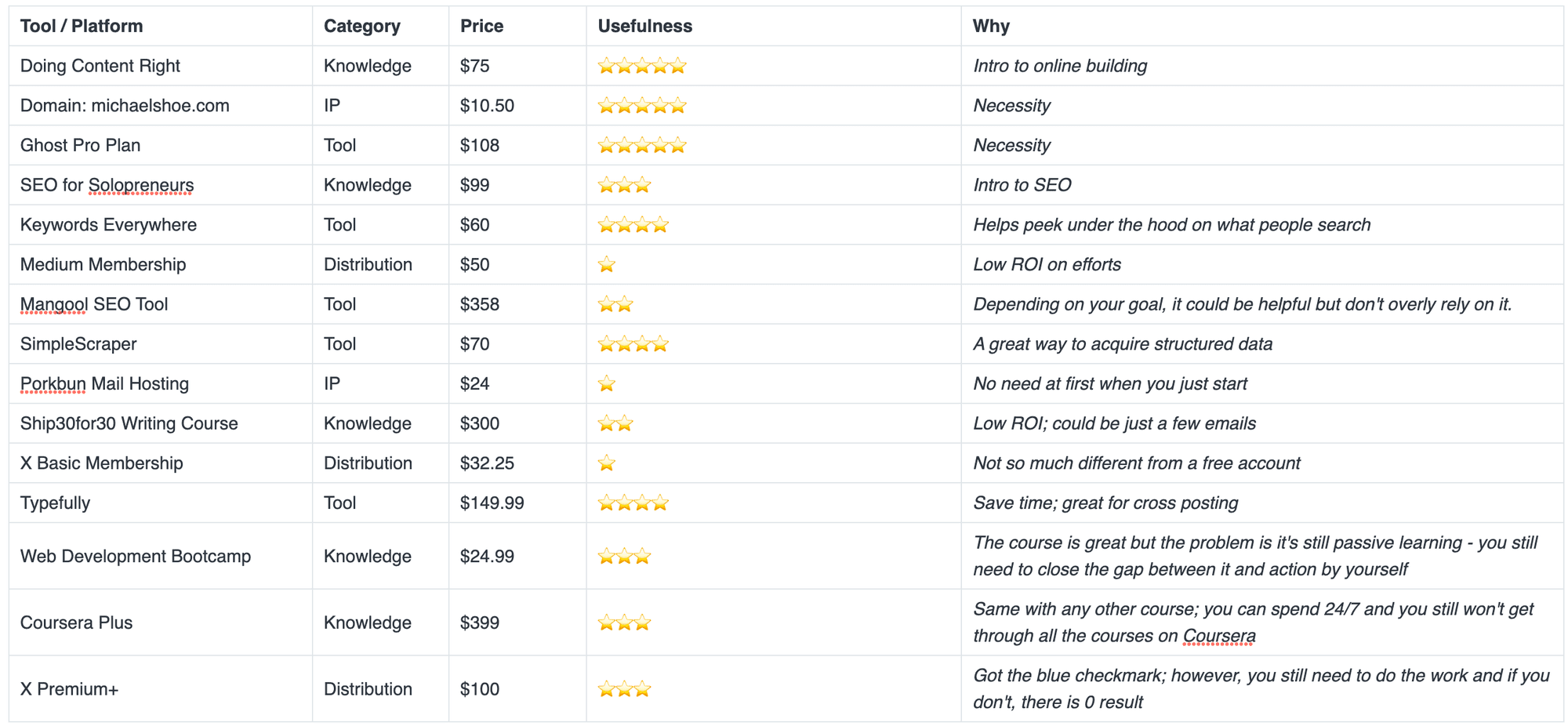
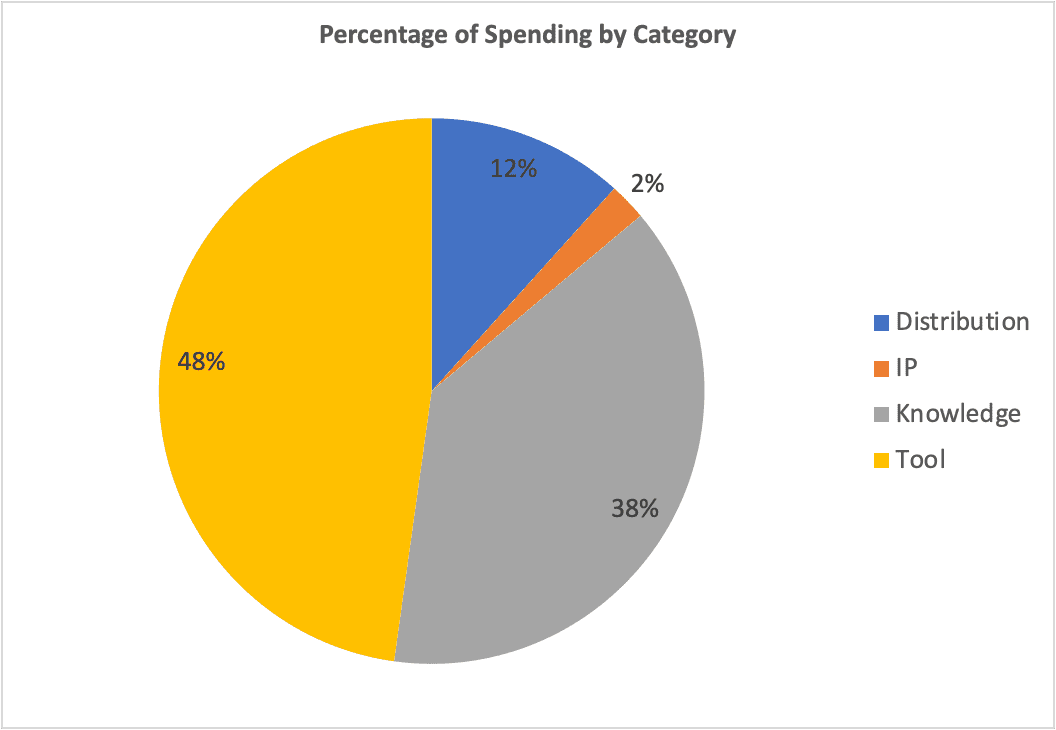
Expenditure Analysis and Ratings
Learnings from the first year of building online
I invested heavily in knowledge and tools, but inputs alone don’t create results—I need to tie every tool or course to a concrete output to truly benefit.
I experimented with many overlapping tools and platforms, but depth is more valuable than breadth—focusing on a few key tools and mastering them is more effective than spreading myself too thin.
I spent time learning before monetizing, but learning must be paired with action—even small experiments that generate revenue are better than perfect knowledge without application.
I consumed multiple courses and resources, but knowledge is most valuable when applied—by turning lessons into tangible projects, I can accelerate skill development and track real-world outcomes.
I started small with IP and distribution. However, low-cost experiments are essential—they allow me to test ideas, explore channels, and gain insights without risking significant capital.
I tracked spending loosely this year, and I learned that tracking ROI is crucial—documenting cost, effort, and outcomes for each investment helps me optimize future spending and avoid wasted money.