Michael

  • The Fears We Inherit

    The Fears We Inherit

    Growing up, I was told a lot of things — mostly by adults, mostly my parents.

    They were bound by their own experiences, the experiences that shaped the lives they live today.

    But looking back, I see now that many of these lessons were just fears.
    Their fears reflected onto my life.

    And slowly, I started to believe them.

    • You have to be great at math to work in tech.
    • You can only go so far in another country because you’re not a citizen.

    Maybe some of these statements were true in certain contexts. But I took them as universal truths, without questioning, without research.

    As I grew older, the list of these inherited “truths” kept piling up.

    It wasn’t until I passed the age of 35 that I realized most of them were just mindsets, not realities.

    They’re like tiny shackles on an elephant’s leg — placed there when it was young, so it grew up believing it couldn’t break free.

    Looking back, I can see how many of my decisions—or failures to decide—were shaped by these invisible chains.

    Here’s the truth: they are not real.

    You can find paths in this world that no one has traveled before.
    Whether you actually reach the destination is irrelevant.
    The only thing that matters is that you take the first step… and keep walking.

    That’s all that matters.

  • Should You Noindex Archive Pages in GeoDirectory? (Thin Content & SEO Tips)

    Should You Noindex Archive Pages in GeoDirectory? (Thin Content & SEO Tips)

    Intro

    While working on my TutorLounge project, I started worrying about archive pages with thin content in GeoDirectory.

    For example:

    • Category archives like /student-levels/early-childhood/
    • City archives like /new-york/white-plains/

    Some of these pages had very little content, and I wasn’t sure if they might hurt my SEO.

    So I asked GeoDirectory support: “Should I set certain archive pages as noindex, or just leave them?”

    Here’s what I learned.


    Problem

    GeoDirectory generates a lot of location and category archive pages. But not every city or category has enough listings to justify its own page.

    Result: you end up with thin pages (basically empty archives). The big question:

    • Do thin pages hurt SEO?
    • Should I noindex them?

    Solution

    The answer depends on your setup.

    1. Use an SEO Plugin (Yoast or Rank Math)

    Both Yoast and Rank Math let you easily control indexing:

    • You can noindex specific categories, tags, or CPT archives.
    • Or you can go page by page and mark thin archives as noindex.

    2. How Google Sees Thin Pages

    According to GeoDirectory support:

    • A few thin pages among strong ones are usually ignored by Google.
    • Having too many thin pages may hurt overall site quality.
    • If you’re unsure, it’s safer to noindex thin or low-value pages.

    3. Decide What to Keep Indexed

    • Keep indexed: important cities, strong categories with good listings.
    • Set noindex: small cities or categories with little/no content.

    Extra Notes

    • Sometimes Google automatically doesn’t rank thin pages — so you don’t always need to panic.
    • But manually setting noindex gives you more control and keeps your sitemap cleaner.
    • If you later add more listings to those thin pages, you can always remove the noindex tag.

    Conclusion

    Thin archive pages are common in GeoDirectory sites, but they don’t have to ruin your SEO.

    👉 Rule of thumb:

    • Keep high-value archives indexed.
    • Noindex thin/empty ones using Yoast or Rank Math.

    This way, you keep Google focused on your best content while still building out your site’s structure.

  • Fixing Sticky Columns on Mobile in GeoDirectory (Blockstrap)

    Fixing Sticky Columns on Mobile in GeoDirectory (Blockstrap)

    Intro

    After setting up my sticky sidebar column in GeoDirectory, it looked great on desktop.

    But when I checked on mobile, things broke — instead of stacking nicely under the main content, the sidebar turned into a slim, squished column.

    Here’s how I fixed it.


    Problem

    On desktop: sidebar = 25% width, content = 75%.
    On mobile: sidebar stayed at 25%, instead of expanding to 100%. This caused an ugly layout.


    Solution

    The trick is to use Blockstrap’s responsive column widths.

    1. Select the parent columns in Blockstrap editor.
    2. In Column Width settings:
      1. On Desktop:
        1. Left content column = 3/12 (25%).
        2. Right sidebar column = 9/12 (75%).
      2. On Mobile:
      3. Both columns = 12/12 (full width).
    3. For the child sticky column inside, always keep it at 12/12 (100% of parent).

    Use the device selector in the column width settings to apply different widths per device.


    Extra Notes

    • This is one of those small Blockstrap features I didn’t realize existed — you can toggle between desktop, tablet, and mobile column widths right in the editor.
    • Once I set them, the sticky sidebar stacked perfectly under the content on mobile.

    Conclusion

    Sticky sidebars don’t have to break your responsive layout. Just set column widths per device (desktop vs. mobile) in Blockstrap, and your design will look great everywhere.

  • How to Make a Sticky Sidebar Column in GeoDirectory (Blockstrap)

    How to Make a Sticky Sidebar Column in GeoDirectory (Blockstrap)

    Intro

    When I was customizing my GeoDirectory search results page, I wanted the right-hand sidebar (with filters) to stay fixed while scrolling — basically a sticky column.

    It’s not obvious how to do this in the Blockstrap editor, but GeoDirectory support showed me the trick.


    Problem

    By default, columns just scroll away with the page. I needed the search filters column to remain visible while the listing results scrolled.


    Solution

    Here’s the simple way to make a column sticky:

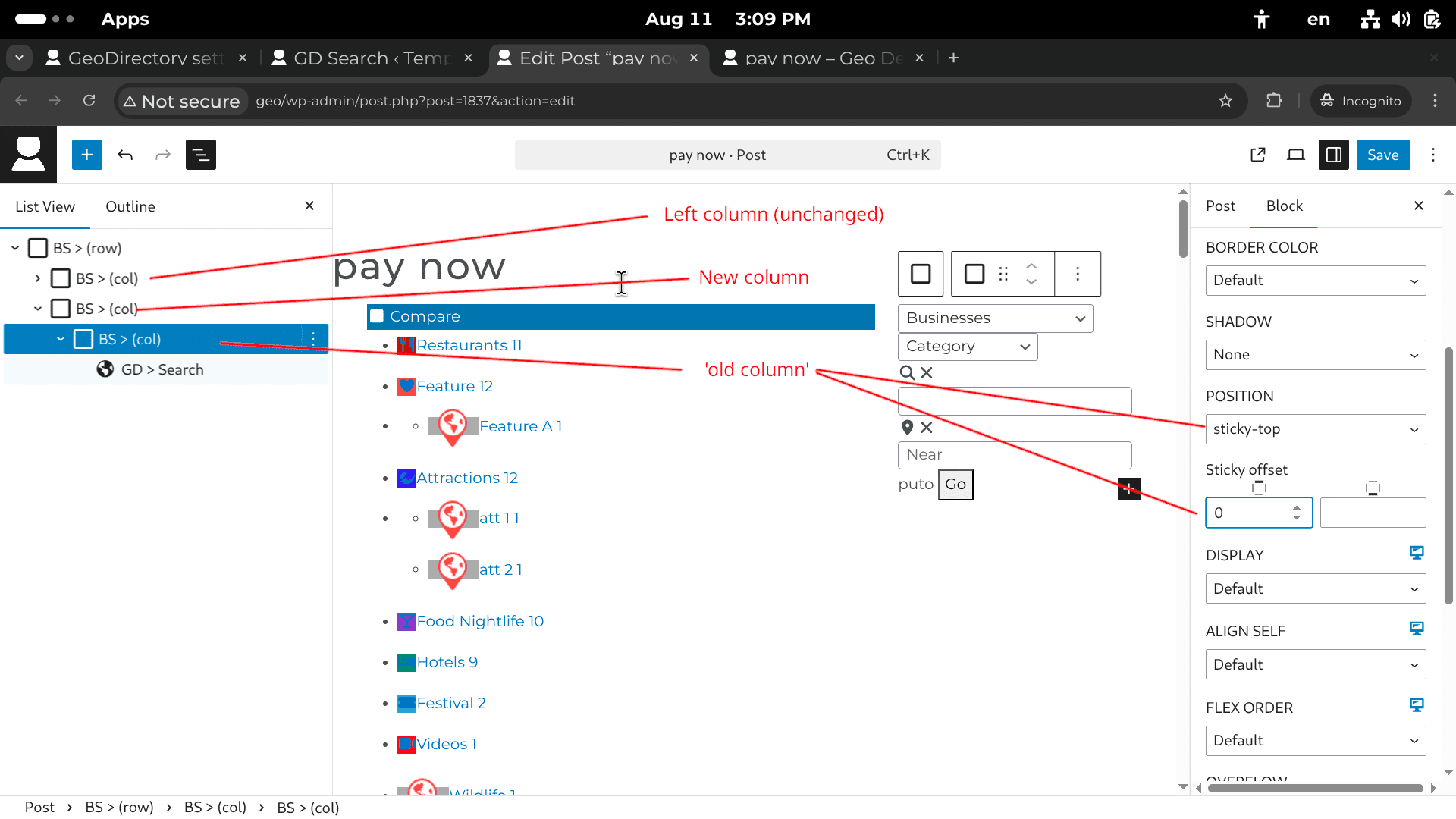
    1. In the Blockstrap editor, wrap the sidebar column inside a new BS > Container (col).
      1. Example: Right column → wrap it in its own parent container.
    2. Select that new parent container.
    3. In the Block settings (right panel):
      1. Set Position → sticky-top.
      2. Adjust Sticky offset (in pixels) to control how far from the top it “sticks” when scrolling.

    This keeps the sidebar fixed in place while the main content scrolls.


    Extra Notes

    • In my case, the “old column” was the one containing the GD > Search template part and the GD > Locations widget.
    • The offset is useful if you have a fixed header (so the sticky column doesn’t overlap it).

    Conclusion

    That’s it! Just wrap your sidebar column, set it to sticky-top, and you’ve got yourself a sticky filter column in GeoDirectory.

  • Fix: GeoDirectory Location and Archive Pages Missing from Rank Math Sitemaps

    Fix: GeoDirectory Location and Archive Pages Missing from Rank Math Sitemaps

    Introduction

    I ran into an issue where my GeoDirectory location pages and archive pages weren’t showing up in Rank Math’s sitemaps. This was a problem because without them, Google couldn’t properly crawl my directory site.

    Here’s how I fixed it.


    The Problem

    • Rank Math was only generating sitemaps for my listings, not for my location pages or archive pages.
    • I had added new regions and cities after Rank Math initially created the sitemap, which I suspect was the cause.

    The Solution

    The fix came down to enabling the correct settings with GeoDirectory’s Location Manager addon.

    1. Make sure the Location Manager addon is installed and activated.
    2. Go to: GeoDirectory → Settings → Locations → Settings
    3. Click Show Advanced.
    4. Under Rank Math Sitemaps, select the locations and CPTs (custom post types) you want included.
    5. Rank Math will now generate:
      1. locations/{city} → one sitemap for each city.
      2. businesses/{city} → one sitemap for each CPT in that city.
      3. Plus additional sitemaps for taxonomy archives.

    After enabling this, my missing sitemaps finally appeared.


    Extra Notes

    • If you added new regions or cities after Rank Math already generated the sitemaps, you may need to refresh the cache.
    • This setup ensures each location has its own sitemap, which is great for SEO.

    Conclusion

    If your GeoDirectory location and archive pages aren’t showing up in Rank Math, don’t panic. Just enable them under Location Manager → Rank Math Sitemaps, and they’ll start appearing correctly.